
How to spot a phishing email
Phishing does not defeat your software. It defeats your attention, usually by manufacturing a reason to hurry. Here is what to look at, in order.
No partner links on this page. This guide is reference material and carries no commercial links. The site as a whole is funded by partner links on our buyer's guides — see the affiliate disclosure.
The anatomy of a fraudulent message
The example below is invented. It reproduces no real company's branding, because the pattern is what matters and the pattern is almost always the same.
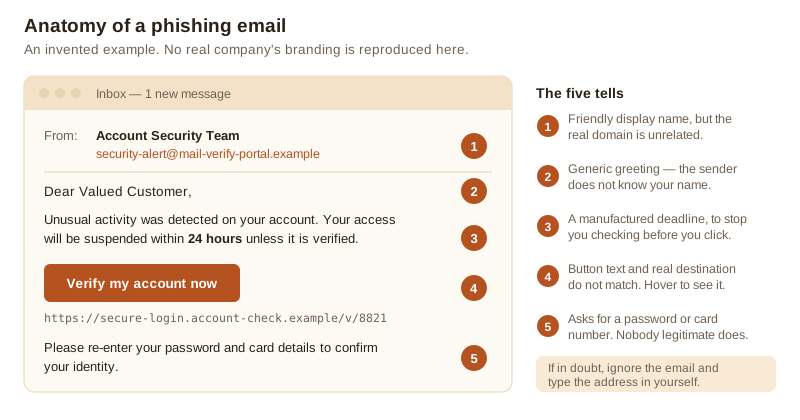
1. The real sending address, not the display name
The friendly name in your inbox is free text chosen by the sender. It is not evidence of anything. Expand the header and read the actual address. A message about your bank arriving from a domain that is not your bank's is finished at that point. Watch for domains that read plausibly at a glance: lookalikes with an extra word, a hyphen, a different country suffix, or a character substitution.
2. A greeting that does not know who you are
“Dear Valued Customer” or your email address used as a name means the sender is working from a list. A provider you actually have an account with normally knows your name. This tell is weaker than it used to be, because stolen databases often include names — treat its absence as neutral, not reassuring.
3. A deadline that exists to stop you checking
Twenty-four hours. Your account will be suspended. Your parcel will be returned. Your refund expires. Urgency is the one element present in nearly every phishing message, because the attack fails if you have time to think or to ask somebody. Treat a countdown in an unexpected message as the signal itself. Real organisations do occasionally send deadlines, but they survive you logging in separately to check.
4. Link text against link destination
Hover over the link on a computer, or press and hold on a phone, and read the address that appears. Compare it with the domain you expected. Shortened links and tracking redirects are common in legitimate mail too, which makes this harder than it should be — when the destination is opaque, fall back on rule five.
5. What it is asking you to do
No legitimate provider asks you to confirm a password, a full card number, a PIN or a one-time code by following a link in an email. If the message is asking for any of those, the answer is no, regardless of how convincing everything else looked.
The rule that makes the other five optional
Never act on the link. Close the message, open your browser and reach the organisation the way you normally do — a bookmark, the app, or the address typed in yourself. If the alert is real it will be waiting for you inside your account. This single habit defeats nearly all of it and requires no judgement about typography.
Where else this arrives
The same script runs over SMS (“smishing”), phone calls (“vishing”), messaging apps, and increasingly through advertising and search results that place a fake support number or a fake login page above the real one. Two variants worth naming:
- Multi-factor fatigue. Repeated approval prompts pushed at you until you tap “yes” to make them stop. If you did not just log in, every prompt is an attack and your password is already known.
- Invoice and delivery pretexts. An unexpected invoice, a small customs fee, a redelivery charge. Small amounts lower your guard; the point is the card details, not the fee.
If you have already clicked
- If you entered a password, change it now — on that account and on every other account where you used the same one. Do it from a different device if you can.
- Turn on two-factor authentication on the affected account, and sign out all other sessions from the account's security settings. A stolen session cookie survives a password change; ending sessions is what kills it.
- If you entered card details, contact your bank and ask them to block the card. Speed matters much more than the conversation being comfortable.
- If you ran a downloaded file, disconnect from the network and run a full scan with whatever security software you have, including a boot-time or offline scan if it offers one.
- Report it — to your provider, to your employer if it arrived at work, and to your national reporting service. In the Czech Republic that is NÚKIB and the Police of the Czech Republic; in the UK, Action Fraud and the NCSC's reporting address.
Nobody is impressed by a clean record here and everybody is helped by a fast report. Phishing works on professionals; reporting it quickly is the skilled response, not an admission of anything.
Sources
- UK National Cyber Security Centre, phishing guidance and reporting: ncsc.gov.uk
- ENISA Threat Landscape, phishing and social engineering: enisa.europa.eu
- NÚKIB, Czech National Cyber and Information Security Agency: nukib.gov.cz
- Europol, Internet Organised Crime Threat Assessment: europol.europa.eu